
Flexible AI workflow automation
Where Imagination Meets Automation
You Imagine. We Create.
Want a live taste of my automation?
The Workflow
.01
Flexible Forms
Collect data and segment Leads based on your desired criteria
.02
Email Sequence
Automate Your Follow-Ups and Personalize Every Message
.03
Notify your team
Never Miss a Hot Lead with Automated Notifications
When interested, the leads can notify your sales team immediately through the mail. My automation can notify through mailing but also through sms if we expect it is an urgent/high profile lead. I can automate time schedules to set up meetings and set up reminders to both the sales and the lead when the time comes.
.04
Send Proposal
Let Automation Handle Follow-Ups While You Close Deals
If your service is approved then the only thing you have to do is notify my automation so it can send your new customer a proposal and give them reminders if they didn’t response after days or weeks. Depending on your preference. We can even notify you if the proposal is signed or if it hasn’t been touched in a week or two.
.05
Send Invoices
Smart Invoice Automation with Payment Reminders and Team Alerts
As the customer approves the proposal, the lead receives an automatic email sending the invoice details to them. We can even track if the invoice has been paid and if not they’ll receive payment reminders. In all cases, I can notify your team.
.06
Booking Invoices
Seamless Payment Tracking and Recurring Billing Automation
When the customer has completed the transaction. My automation will automatically update the status to paid in your preferred administration software. If you sell a recurring service, it can also send invoices automatically every desired period by your choice.
.07
Post Sale Engagement
Keep Customers Engaged
After the cycle has come to its end, the automation can allocate the customer into your post sale engagement campaign. Where you have the flexibility to keep your new customer loyal. It can send a thank you mail, asking for reviews or testimonials and also assign them to the newsletter.
A brief dive into a few of my automation projects
Simple, smart automations built for your workflow
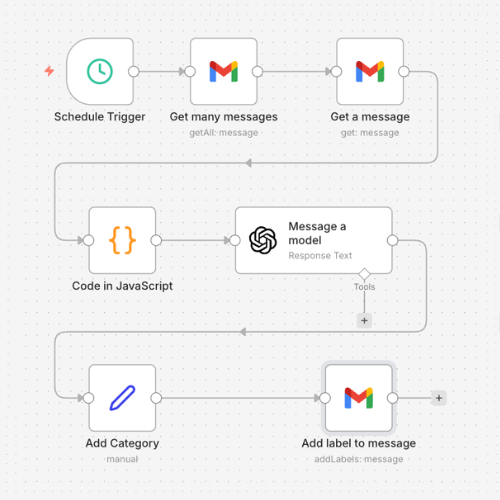
Email Labeling
This automation automatically scans incoming emails and assigns them to the correct label or folder based on predefined rules, such as sender, subject, or keywords. This keeps your inbox organized, saves time, and ensures important emails are easy to find without manual sorting
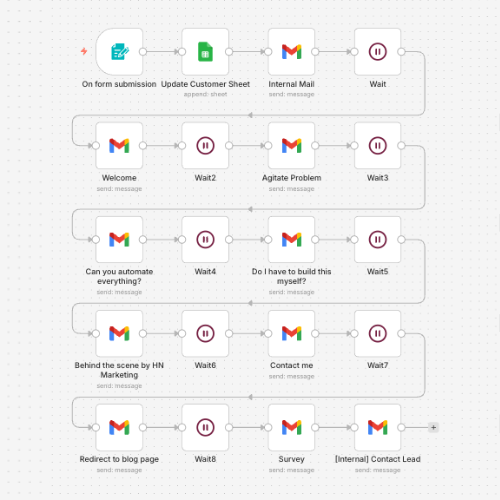
Email Sequence
Once a form is submitted, the system automatically sends a series of emails to confirm the request, share valuable insights, and explain the next steps. This keeps the lead informed, builds trust, and prepares them for a smooth and personal follow-up.
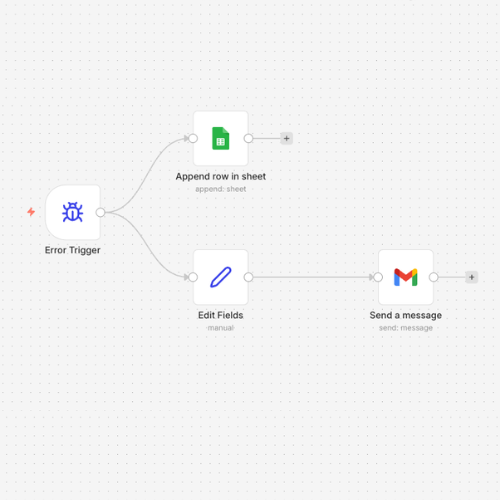
Error Handling Workflow
If something goes wrong, the system automatically detects the error and sends a notification, so it can be resolved quickly without disrupting your business. This ensures your automations remain reliable and dependable at all times.
What I have created
Frequently Asked Questions: Automation Service
Got Questions? We've Got Answers
What is automation?
Automation is the process of using technology to perform tasks automatically without manual work. For businesses, this can include automatically sending emails, organizing leads, updating spreadsheets, or connecting different platforms so information flows smoothly between them.
How does automation work?
Automation works by creating workflows that trigger actions when something happens. For example, when someone fills out a contact form on your website, the system can automatically send a confirmation email, notify your team, and store the lead in your database.
What tools do you use?
The automation systems are built using reliable automation platform called N8N which has many integrations that can connect to your existing tools, such as email services, CRM systems, websites, and other business platforms. This allows your systems to communicate and work together automatically.
Do I need technical experience?
No technical experience is required. Once the automation system is set up, it runs in the background and performs tasks automatically. You simply continue using your existing tools while the system handles the repetitive work.
How much does automation cost?
The cost depends on the complexity of the automation and the number of systems involved. Simple workflows are quicker to build, while more advanced automations that connect multiple platforms require more setup. Pricing is typically discussed after understanding your specific needs.
If I want to change something in the automation, what do I do?
If you want to adjust part of the automation, such as changing a workflow or adding a step, you can simply contact me. The system can be modified to match your updated business processes.
What if I want to customize the emails?
Emails that are part of the automation can always be customized. You can change the text, design, timing, or number of emails depending on what works best for your business and communication style.
How do I know the automation works?
Before the system is fully launched, the automation is tested to ensure every step works correctly. Once it is live, I will monitor the workflow to see that tasks are being completed and emails are being sent successfully.
Can you track if emails are opened?
To track opens and clicks, the system usually needs to be connected to an email service platform such as Mailgun, SendGrid, or Mailchimp. When emails are sent directly through Gmail, tracking capabilities are limited and typically only replies can be monitored.